
When it comes to backing up photos, it goes like this: no one does it until a hard drive fails and they lose data. And, as the saying goes, having one is like having none at all – a backup only matters when you have more than one.
Backing up is a ungrateful and boring task, which is why it's worth having a fast system that runs almost automatically. And it is always better to do it on a regular basis. I guarantee that it will be harder to tackle if you end up with several terabytes of data to process. Been there, done that.
But first things first:
SD cards in the camera – my Sony A7III has two slots, which immediately reduces my stress about data loss until I do a double backup,
external drives – I started archiving my private projects with a 1TB Seagate Basic, and for client work, I used a hard drive from the same brand that I bought accidentaly (this one got broken very fast); recently, I’ve been working with a 1TB Portable SSD from Samsung. They’re not the cheapest tho, but so far, so good,
consistency and regularity – I archive my photos every month, which gives me a sense of control over most of the material. And in case something goes wrong, I’ll only lose photos from at most one month.
my back up workflow
Folder Organization
On my computer I have folders for raw files from the entire month (01 January, 02 February, etc.), grouped into subfolders depending on the category of the photos (01 north sea, 01 travel, etc.), and within them, I have specific photo shoot days (e.g., 01 The Hague, 01 Rome, etc.).
Copying Photos to the Computer
As mentioned, my camera has two card slots. One of them automatically serves as a backup. I copy the photos from the second card to the computer into the corresponding raw folders, whenever I feel like I want to edit them. Most often it is right after the shoot. I only format the cards once they are almost full.
Import to Lightroom and Editing
In Lightroom, my folders are also grouped by months and categories, just like the folders with the photos on my computer. First, I go through the selection process and mark the total junk first. I permanently delete only these from the disk. Then, I edit the selected photos (marked with 3 starts when unedited yet, 5 start when edited). Usually, it’s about ⅓ of the total. I mark the greatest hits with a color label.
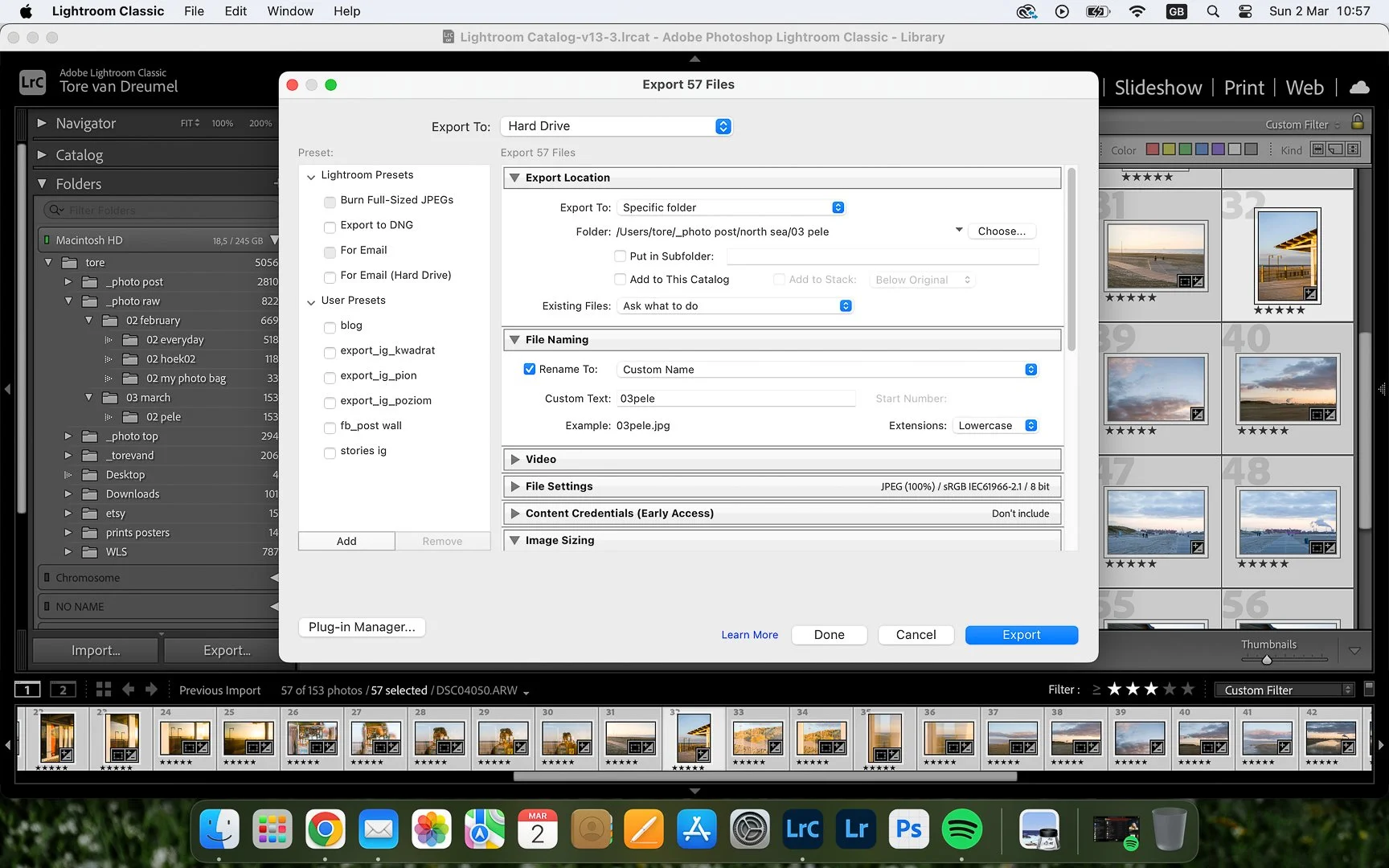
Export to Computer Drive
I export the edited photos to a folder with JPGs, named by project name and a month (eg. 01 the hague). First, I export the photos in their original size, then smaller ones for social media and websites go to folder “small”. Finally, I export DNG files to a subfolder “dng,” which contains the edited versions of the photos.
First Backup
At the start of each month, I copy the raw files (all, including the unedited ones) + JPG + DNG from the previous month to SSD drive no 1. This drive has two subfolders: raw and jpg (I also store DNG here). The rest of the folder organization is the same as on my computer: each year, month, category, and project has its own folder. I use this drive when I need access to the photos for some reason.
Second Backup
Then, I copy the JPG files (along with the DNG folder) to a SSD drive no 2, which serves solely as a backup archive and, for the most part, stays quietly at the bottom of my drawer.
Greatest Hits
Photos marked in red as greatest hits (usually 2-3 photos from a single shoot) are uploaded to the cloud on Google Drive in their original size. This way, I have an additional backup and access to those photos, even if I’m away from home.
Deleting Photos from the Computer and Camera SD Card
I delete the raw files from the computer and the SD card only after making two backups. JPG files are only deleted when I run out of space on my computer’s drive.
This is my working system. At the beginning of my photography journey, I didn’t pay much attention to double backups, but history (mine and others’) has shown that every device can fail anytime. It happened once that I lost a part of my client’s work (luckily already delivered) and I wouldn’t want to lose even one single file anymore. Therefore since then I am very careful and pay a lot of attention to backing up my work. Can’t recommend it more.
I created a guide (well, a mini-course is a better word), which will help you make more compelling, clean pictures.
It includes a little bit of theory, example images and practical tips/exercises.
Do you want to start making minimalistic, clean images that stand out? That guide is for you. And yes, it’s FREE.
If you find value in this blog, you can support it by exploring my products.
Every purchase helps sustain the articles, resources, and work I share here. Thank you.

A structured 100-day photography programme designed to help you see more, notice more, and photograph more consistently.
Through 100 thoughtfully crafted prompts, examples, and guidance, this programme builds your visual awareness, technical confidence, and personal style — at your own pace.
For beginners and intermediate photographers who want to move past creative blocks and develop a lasting photographic habit.
This programme includes:
100 photography prompts across 4 creative categories
100+ selected example images from the author
practical guidance for selected tasks
lifetime access (PDF download)
This programme is for you if:
you feel creatively stuck
you want to build a photography habit
you want to develop your visual style
you want structure without pressure, at your own pace.
Technical details:
Format: PDF
Pages: 106
Language: English
Instant download (PC and mobile phone).
FAQ:
Is it suitable for beginners?
Yes. The programme is designed for beginner and intermediate photographers. Tasks focus on seeing, awareness, and visual exploration rather than technical difficulty.
What camera do I need?
Any camera is fine — DSLR, mirrorless, compact, or smartphone. The programme develops your eye and visual thinking, and it’s not about gear.
How much time I need?
Most tasks can be done in 15–30 minutes. Some may naturally expand if you want to explore further, but the intention is to make practice possible even on busy days.
Are there instructions or just prompts?
The programme includes prompts, guiding context, and more than 100 example photos to help you approach the tasks.
Is it a course?
No, it’s a structured creative practice programme. There are no lessons or technical lectures. Instead, you build skill through doing and observing.
Instant access after purchase.
No subscription. One-time purchase.
Please note that since it is a digital product, purchases are non-refundable. However, if you experience any issues, feel free to get in touch — I’m always happy to review situations individually and help where I can.
The file may not be reproduced, shared, distributed, or resold, whether unchanged or adapted.
By buying this programme you support this blog enormously. Thank you.